Two days ago a new gigabyte motherboard a ga-ep35-ds3r, short : ep35, arrived. This as a replacement to my ageing, but still very fast, asrock conroexfire-esata2. Together with the ep35 i also got 2x2gb team elite ddr2-800 ram for the new motherboard. Why a new board when the old one is still wokring good ? Well i plan to buy a E8400 when they are available. That new 45nm cpu does not work on the old asrock, and i also had problems getting 4gb to work on the asrock. Furthermore the ep35 allows quite a bit of overclocking, so i can finnaly run my E6600 a bit faster. The asrock board is not suitable for overclocking.
Box contents :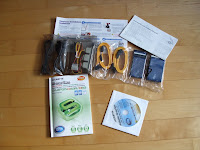
Beside getting the board, you will also find a quite large selection of extra's in the box of the ep35. You get 4 sata cables, 1 floppy cable, 1 ide
cable, manual, quickinstall guide, driver disk, a Sata backplate with cables. Quite a lot for a mid price board.
layout :The layout has some problems as seem to be the standard nowadays. The IDE connector is at the extreme bottom of the board instead of next to the large power connector. This gives some problems with routing the big ide cable through the case. It is really better to swap it with the place of the floppy connector in the middle of the board.
Also the 12volt power connector is at the top left of the board, not a problem if you have a normal atx case where the powersupply is above the board, however if you have a coolermaster CM690 with the powersuppy on the bottom of the case you can run into some wiring problems. The thrid and final layout problem is the place of the connector of the audio front panel, this is at the left of the board instead of on the bottom, now i have a cable running over the hot 8800 gt.
Installation Vista / Leopard osx86 :Installing was very easy, gigabyte includes a large quick install manual that is very understandable. So if you never assembled a pc before it is not that difficult to do. Vista + sp1 installed without any problems, and the drivers from the driver disk, or better the gigabyte website also.
As i already had a leopard install on my old board, i tried to start leopard with my new board and the old install on the harddisk. To my great suprise this worked ! Leopard start without any hickups, the only thing i had to do was install a .kext for the new onboard sound. This is really amazing as leopard is certainly not made to survice a new motherboard.
 Bios :
The bios is very complete also due to the 2 sata controllers that are on the board. The intel ich9r chip takes care of 6 SATA connections with a possibilty of ide, ahci or mode modes. Adding to that is a gigabyte controller with a further 2 sata port and an ide port. This controller also allows ide, ahci and raid modes.
The overclocking section is very complete with easy to understand help and clear selection of parameters. You can have the board do it for you, or you can select each and every parameter yourself. The board allows you to store different overclocking profiles within the bios, so you do not have to remember all the settings instead you can save them under names like "overclocked", "normal", or any other selfmade name.
Flashing the bios has it's own selection on the ep35, so you do not have to boot from a dos floppy. Just insert a usb stick with the new bios and flash
it from the bios flash utility. Furthermore there is an option to have the ep35 make a shadowcopy of your os install. I did not check this as i normally make a backup of vista with the system backup utility in vista itself.
Special options :On this board there is a power saving option that comes with a program for windows, i tested it and it functions quite well. It will save about 10-20 watts on the out-of-the-wall power needs. However the utility has a horrible large interface and cannot be used when you overclock. It's use is also quite limited.
Problems :Well there is only one real problem with this board : As soon as you overclock over a FSB of 300, the sleep (s3) function will fail. The board will enter s3 mode without problem, but once you wake the board it will reboot every 5 seconds. The only way to get out of this loop is to cut the power and wait 10 seconds before switching it on again. You will only have this problem with overclocking or when you have one of the new E8xxx cpu's. Gigabyte is informed about this problem and i hope it will be solved in one of the comming bios updates.
The workaround is to have vista go into hibernate mode instead of sleep.
Overclocking :My current e6600 runs normally at 266x9 mhz, i upped it to 333 x 9 for a cpu speed of 3ghz. The memory multiplier is set at 2,4 so you get a clean 800. This is rock stable, apart from the sleep problem. Xbech on leopard get's a nice a fast 189 score !
 OSX leopard fresh install, kalyway :
Leopard works great on this box, the only thing to do is to patch the sound with the 889a kext. The rest works out of the box ! Super !
Conclusion :All in all this is a good board in it's price class. It has tons of features and is very overclockable. If you don't care that you have to hibernate (xp/vista) or just shutdown (leopard) when overclocked, this board is a 9 out of 10. Hopefully the only issue will be solved with a new bios in the comming weeks.